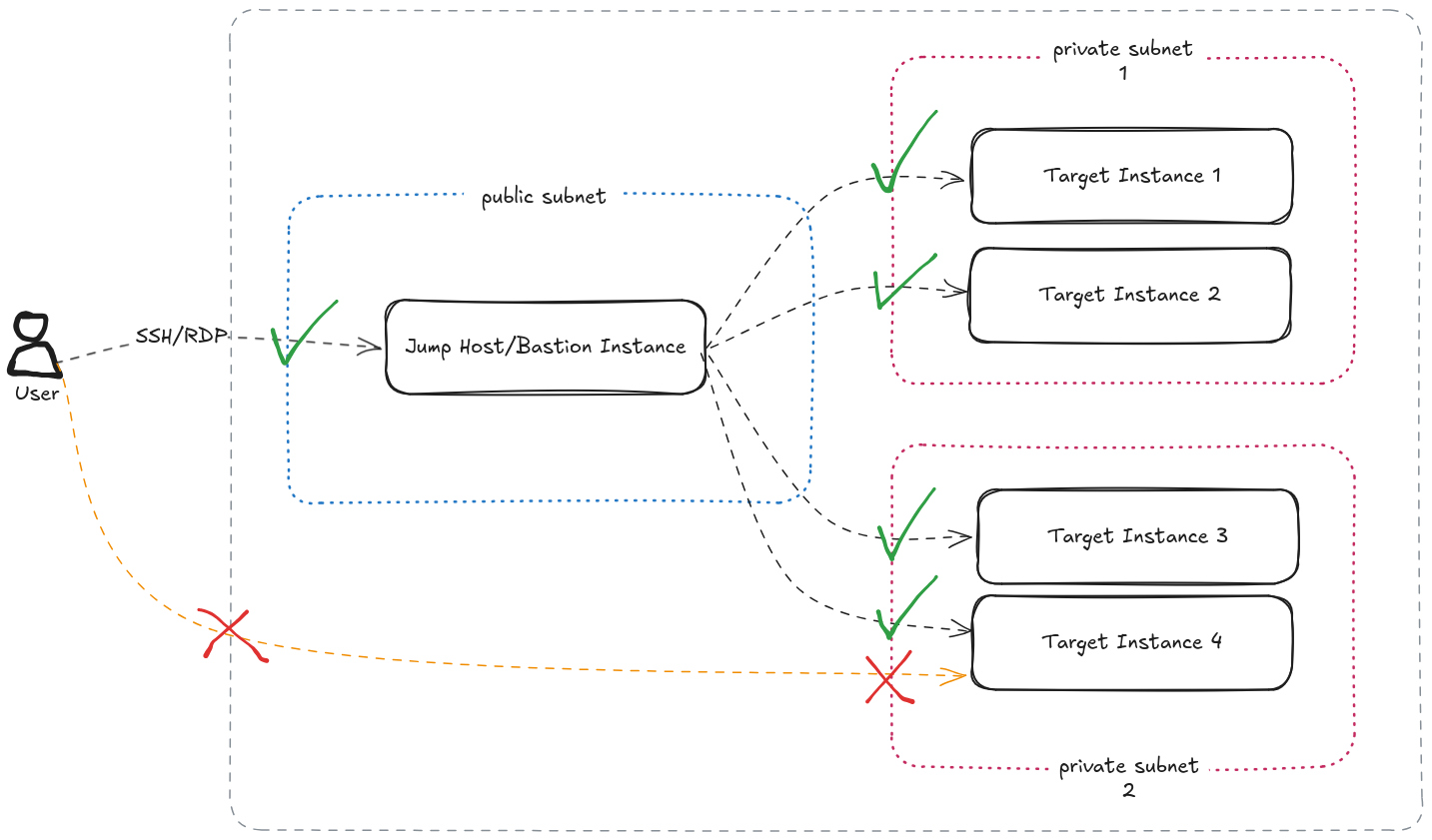
In AWS for example, to access EC2 instances in a private subnet, you would
spawn a small, usually a t3.micro or t3.small, instance in a public
network. You would whitelist the SSH/RDP access from this instance’s Security
Group in the target private EC2 instance’s Security Group.
But here’s the kicker. To do this, you would have to store the access keys for the private instances in the so called Bastion instance. The best practice would be to adjust their permissions so that only the user would be able to read them, but in real world this almost never happens. Worst is when the same key pair is shared across the private instances and the bastion host.
To add to this, now you have a full operating system and programs exposed to public Internet, with all sorts of vulnerabilities that this OS and the software carries. You can limit access by source IP addresses, however if you have people accessing this from different places, then that also quickly becomes an unmaintained whitelist.
I’m not going to focus on the cost factor, because if your use case can work with Burstable class instances, then with Spot pricing, the cost could almost negligible. However, from an optimisation point of view, this is compute that is always running, that doesn’t need to be.
In this post I’m going to talk about one pattern you can use to get rid of this operations heavy workflow, that would be a serious cybersecurity hole in your organisation. Note that this pattern may not be the only option when it comes to getting rid of public facing bastion hosts, but when it comes to being Cloud Native and Operationally Optimised (we are trying to be as much Well Architected as possible here), this approach takes the cake.
Scenario
Let’s consider a typical setup that has a private EC2 instance. Note that I’m talking about a Windows instance here. Accessing a Linux instance this way is even easier.
In my current work, I’m increasingly coming across Windows now. I’m used to working on Linux systems more, so I’m considering this an opportunity to learn Windows basics (other than being able to play games).
The bastion instance usage would require the following pattern.
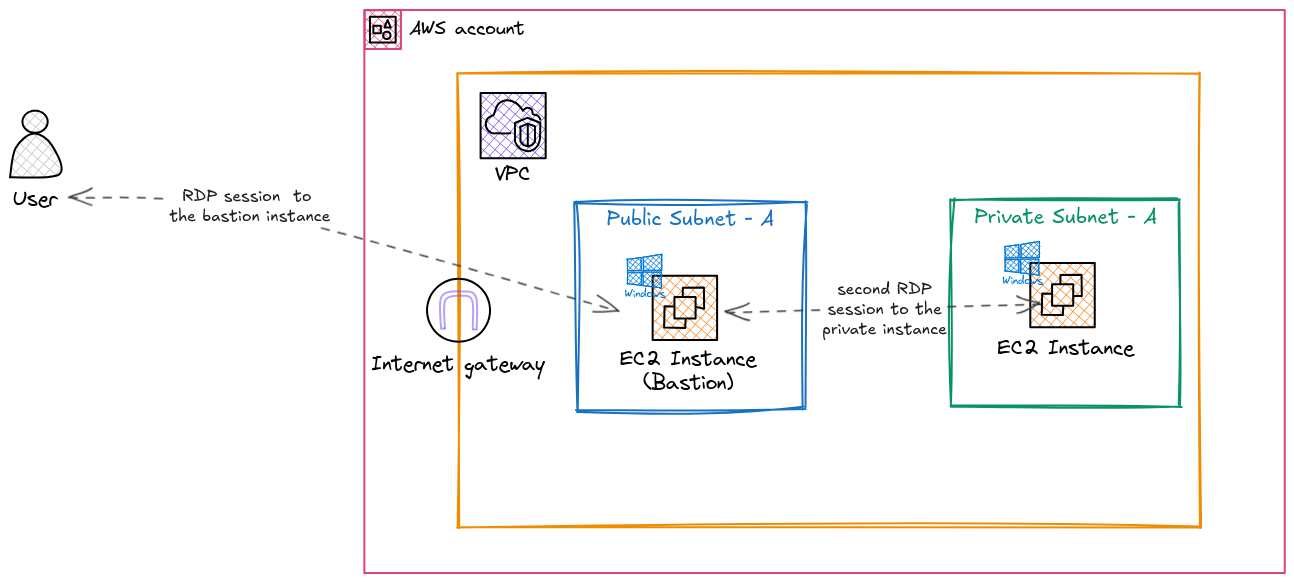
In short, a public subnet, an Internet Gateway, and an additional EC2 instance would have to be spun up for this pattern. This is without considering the operational and security overhead that comes with this baggage.
Instead of this, we are going to use AWS managed services to directly access the instance with minimal operational overhead. And we are going to do that with least privilege principles and logging and monitoring in place.
Design
Services Used
We are going to focus on following outcomes
- make use of managed services as much as possible
- enforce least privilege permissions
- reduce security vulnerabilities
- make use of being cloud-native as much as possible (operational efficiency)
and going to use the following AWS services.
AWS Organizations
This patterns assumes that your AWS footprint is a deliberate design with an Organization, a central Management account, and other services that contributes a Landing Zone of sorts. If your AWS footprint is a single Account or a couple of Accounts that are not managed by AWS Organizations and AWS IAM Identity Center, then there’s a minimum basic set of work that needs to be done before this pattern can be implemented.
AWS IAM Identity Center
Provides us a way to give different users least privilege access to different accounts. No need to share private keys around, in potentially insecure ways.
AWS Systems Manager (SSM)
Specifically Fleet Manager. This provides us a way to connect to SSM Managed Instances without using bastion instance, public facing traffic, or key pairs. SSM also provides us a way to log activity and even record RDP sessions if needed.
CloudTrail
This is an over-arching service that records everything that happens at the management plane (and even data plane if you need to) in AWS. In our scenario, CloudTrail gives us an immutable audit trail of who accessed which instance at which time which can be important if the privat instance needs that level of traceability.
Design in Detail
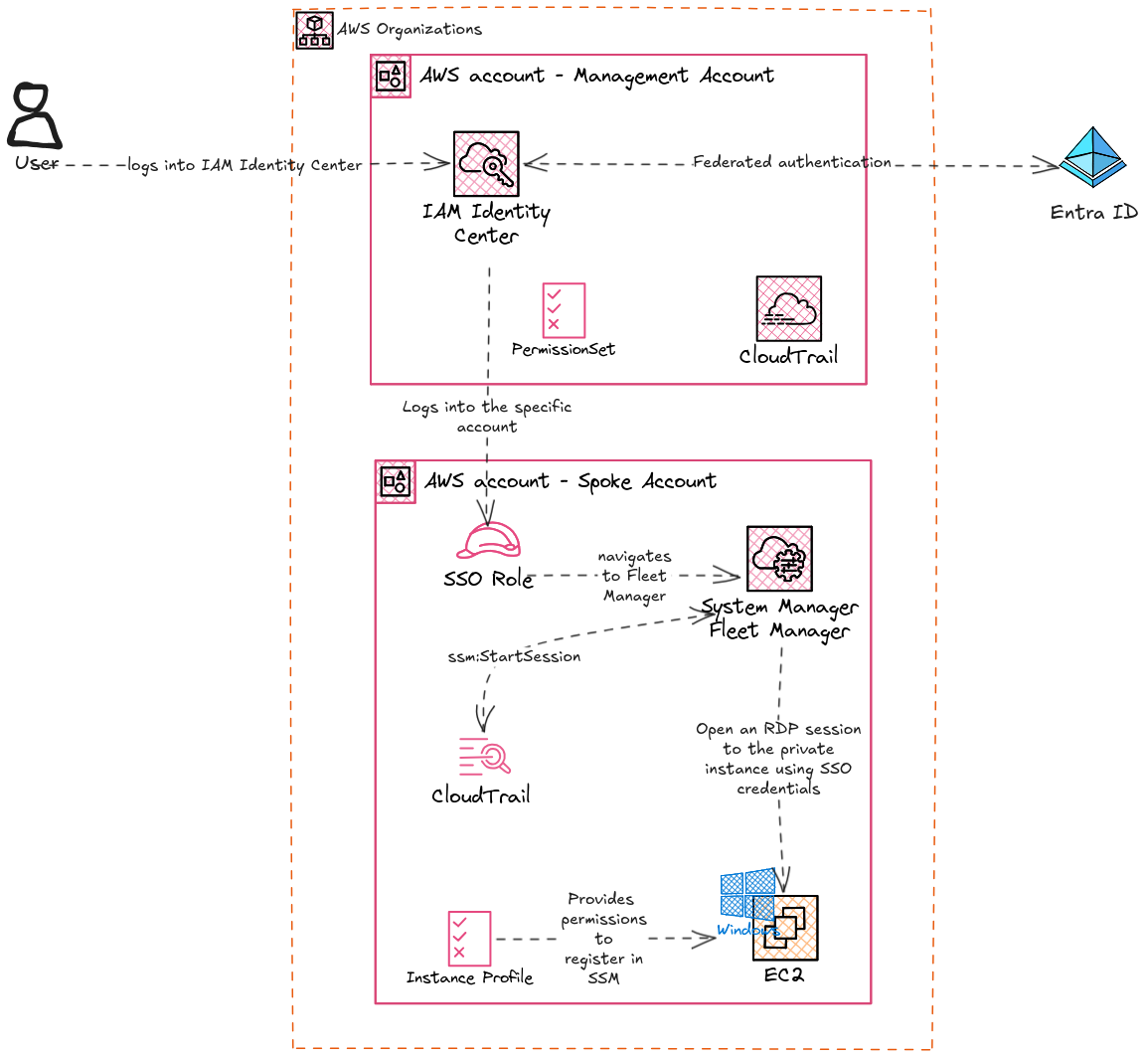
In this design, the user is given least privilege access to the Account that hosts the EC2 instance so that they can access the Management Console and navigate to SSM Fleet Manager. In most instances, this is easier to do since the user would already be in the organisation’s Identity Store (Entra ID, Active Directory, or some othe identity management solution). Even if the intended user is external (vendors, contractors etc), onboarding the user to the identity store is an established process.
After accessing the specific account’s management console, the user will navigate to SSM Fleet Manager, select the instance, and connect through the Fleet Manager RDP Session feature. This provides direct RDP access to the instance with two way clipboard sharing capability that can cover most use cases. The user will be able to do this without using a key pair or having to use usernames and passwords, only using the AWS IAM Identity Center identity (Single Sign-on option).
At the moment, only Chrome and Edge browsers support two-way clipboard capability.
Also, some users may have trouble using the Single Sign-on option if their usernames are longer than 16 characters.
Implementation
User’s access to management console
The first step is to provide the account access to the user. This is a straightforward, as long as the permission set needed is sorted out.
If the use case is a typical job role, then the permission set can be one of the predefined AWS job role policies. For anything else, the bare minimum permissions needed to access the EC2 instance via SSM are as follows.
The following policy restricts access to specific EC2 instances tagged with
application: myapplication. Some permissions can be restricted to resources like this (ex:ec2:GetPasswordData), and some permissions do not apply to specific scopes (ex:ec2:DescribeInstances). The following policy is a result of trial and error after starting from the AWS documentation. Implementing this ensures minimal information is exposed to the user, and they are only allowed to access a specific instance out of a fleet of instances with potentially sensitive information.
In some situations this could be safely opened up to be any resource (
*). However, it is always a good measure to implement least privileged access, and to reduce use of*as much as possible.
{
    "Version":"2012-10-17",
    "Statement": [
        {
            "Sid": "SSO",
            "Effect": "Allow",
            "Action": [
                "sso:ListDirectoryAssociations*",
                "identitystore:DescribeUser"
            ],
            "Resource": "*"
        },
        {
            "Sid": "EC2",
            "Effect": "Allow",
            "Action": [
                "ec2:DescribeInstances",
                "ec2:GetPasswordData"
            ],
            "Resource": "*"
        },
        {
            "Sid": "EC2PasswordSpecific",
            "Effect": "Allow",
            "Action": [
                "ec2:GetPasswordData"
            ],
            "Condition": {
                "StringLike": {
                    "ssm:resourceTag/application": [
                        "myapplication"
                    ]
                }
            },
            "Resource": [
                "arn:aws:ec2:ap-southeast-2:123456789012:instance/i-xxxxxxxxxxxxxxxxx",
                "arn:aws:ssm:ap-southeast-2:123456789012:session/*",
                "arn:aws:ssm:ap-southeast-2:123456789012:managed-instance/i-xxxxxxxxxxxxxxxxx"
            ]
        },
        {
            "Sid": "SSM",
            "Effect": "Allow",
            "Action": [
                "ssm:GetCommandInvocation",
                "ssm:GetInventorySchema",
                "ssm:GetServiceSetting",
                "ssm:DescribeInstanceProperties"
            ],
            "Resource": "*"
        },
        {
            "Sid": "TerminateSession",
            "Effect": "Allow",
            "Action": [
                "ssm:TerminateSession"
            ],
            "Resource": "*",
            "Condition": {
                "StringLike": {
                    "ssm:resourceTag/aws:ssmmessages:session-id": [
                        "${aws:userName}"
                    ]
                }
            }
        },
        {
            "Sid": "SSMStartSessionSpecific",
            "Effect": "Allow",
            "Action": [
                "ssm:StartSession"
            ],
            "Resource": [
                "arn:aws:ec2:ap-southeast-2:123456789012:instance/i-xxxxxxxxxxxxxxxxx",
                "arn:aws:ssm:ap-southeast-2:123456789012:managed-instance/i-xxxxxxxxxxxxxxxxx"
            ],
            "Condition": {
                "ForAnyValue:StringEquals": {
                    "aws:CalledVia": "ssm-guiconnect.amazonaws.com"
                },
                "StringLike": {
                    "ssm:resourceTag/application": [
                        "myapplication"
                    ]
                }
            }
        },
        {
            "Sid": "SSMStartSessionSpecificPortForwardingDoc",
            "Effect": "Allow",
            "Action": [
                "ssm:StartSession"
            ],
            "Resource": [
                "arn:aws:ssm:ap-southeast-2::document/AWS-StartPortForwardingSession"
            ],
            "Condition": {
                "ForAnyValue:StringEquals": {
                    "aws:CalledVia": "ssm-guiconnect.amazonaws.com"
                }
            }
        },
        {
            "Sid": "SSMSendCommand",
            "Effect": "Allow",
            "Action": [
                "ssm:SendCommand"
            ],
            "Resource": [
                "arn:aws:ec2:ap-southeast-2:123456789012:instance/i-xxxxxxxxxxxxxxxxx",
                "arn:aws:ssm:ap-southeast-2:123456789012:managed-instance/i-xxxxxxxxxxxxxxxxx",
                "arn:aws:ssm:ap-southeast-2::document/AWSSSO-CreateSSOUser"
            ]
        },
        {
            "Sid": "GuiConnect",
            "Effect": "Allow",
            "Action": [
                "ssm-guiconnect:CancelConnection",
                "ssm-guiconnect:GetConnection",
                "ssm-guiconnect:StartConnection",
                "ssm-guiconnect:ListConnections"
            ],
            "Resource": "*"
        }
    ]
}
In brief, this policy allows the user to,
- List SSM managed instances in Fleet Manager
- Start an RDP session to the specific instance with a specific tag
As mentioned above, care is taken to restrict these permissions to specific resources and users. This can initially be a pain to setup, as multiple passes are needed to nail down the exact scopes and resource conditions, however doing so makes sure no accidental data leaks will happen.
EC2 instance profile
The target instance should be a Managed EC2 instance for this method to be successful. In other words, the EC2 instance should be registered in SSM Fleet Manager through the SSM Agent.
Most EC2 base images (AMIs) have the SSM agent pre-installed, so it’s a matter
of providing proper permissions to the instance to register in SSM to make it a
Managed Instance. To do this, the managed Policy AmazonSSMManagedInstanceCore
can be attached to the Instance Profile (ARN
arn:aws:iam::aws:policy/AmazonSSMManagedInstanceCore).
For this setup, the minimum SSM agent version supported is 3.0.222.0. This may be a limitation in older setups that cannot upgrade their instances. The Windows version also has minimum version constraints in this setup, so the design is more or less usable with reasonably up to date setup.
Auditing and Traceability
With this approach, there are a couple of ways to trace how users interact with the VM.
CloudTrail event ssm:StartSession can be used as a starter to trace the
events surrounding a session initiation. This is a typical approach for any
activity investigation in AWS. CloudTrail logs can be fed into a SIEM
deployment to identify and react to unexpected instance access events by a
security operations team easily.
In addition to this, Fleet Manager itself offers a connection history view which helps to identify which instances were accessed by which user. This will be more useful to operators in the Cloud to retrieve information about past sessions.
Conclusion
There are some downsides to this approach, like IAM Identity Center based SSO login providing more access than needed to the instances. However, for isolated instances that need access from outside the network, this approach is easy and fast to be implemented, since the only level of access you need to maintain is the access to AWS services. With the above example policy as a start, it is pretty easy to define a well isolated, well scoped policy for external users to access specific targeted instances.